
Your restaurant's books,
in your pocket
Bunchee helps restaurants log income & expenses, track ingredient costs — and now run a QR menu customers order from themselves. Simple enough for every shift.
A QR menu your customers
order from — set up in 5 minutes
Photograph your paper menu and AI builds the online menu for you. Print a QR for each table; customers scan, order and pay by PromptPay — and the order lands in your app instantly. No per-order fees.
- 1Snap your paper menuAI reads every dish and price. Edit, add toppings or spice levels as you like.
- 2Print a QR per tableScan fills in the table number, so nobody has to come and ask.
- 3Orders land in the appAccept, edit or combine bills from your phone. Customers see the status and a PromptPay QR for the exact amount.
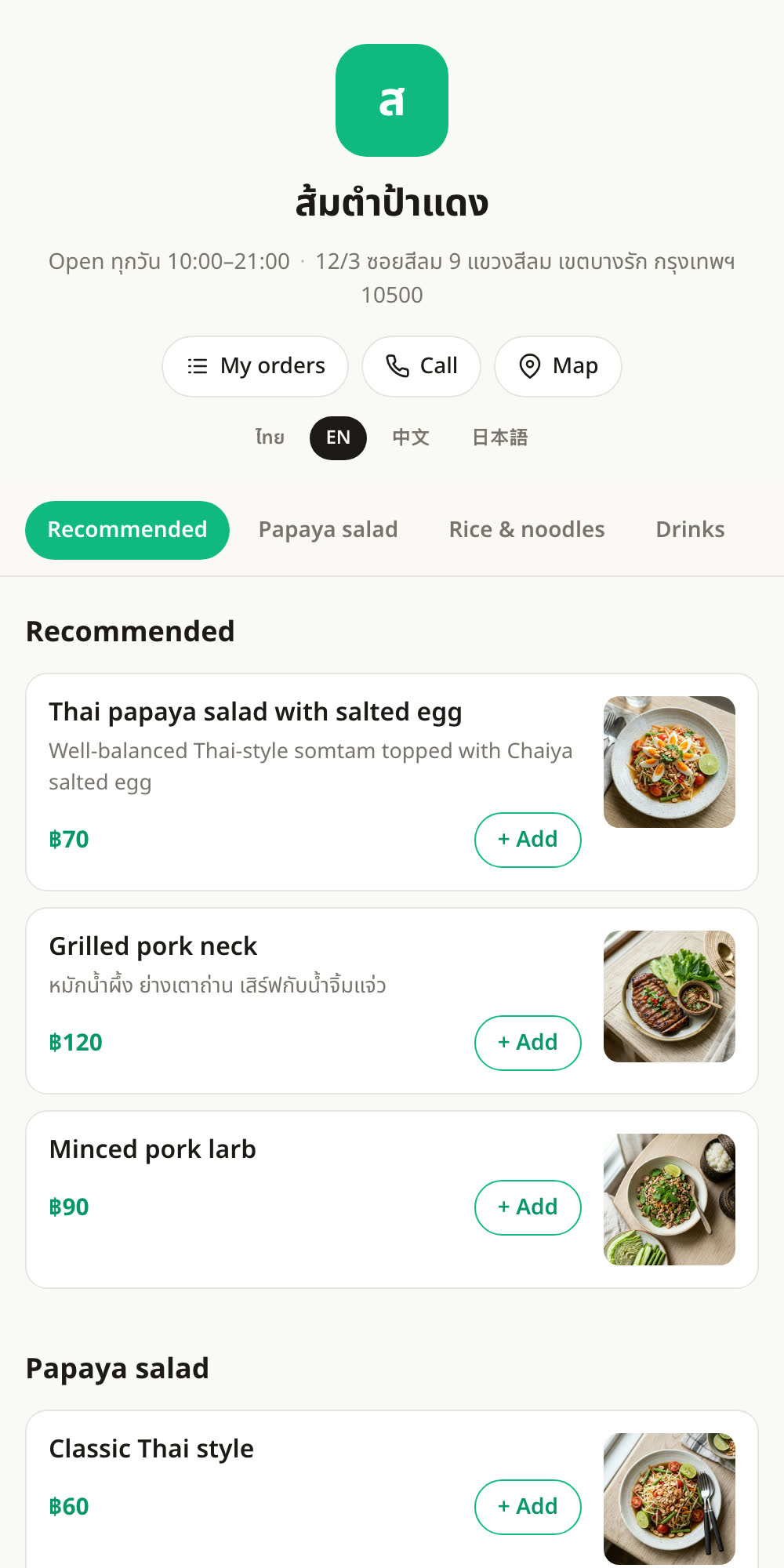
Go ahead and tap — this is what customers see after scanning
Everything your shop needs
Built for restaurants — not another complicated spreadsheet.
Log in seconds
Add income or expenses with categories, notes, and photos — even on the busiest shift.
AI assistant
Ask in plain language — “How much did I spend on ingredients this month?” — and get an instant answer.
Track ingredient costs
See price history per category and spot rising costs before they eat your margin.
Real-time summaries
Daily and monthly totals with charts that update the moment you save.
Face ID lock
Your shop's finances stay protected behind on-device biometric unlock.
Synced everywhere
Securely synced in the cloud — open it on iPhone or iPad and pick up where you left off.
Just snap a photo —
AI sorts it for you
Pick multiple receipts or bank slips at once and let AI pull out each item, price, and date — then auto-sort them into categories. You just review and save.
- 1 Select multiple photos Snap with the camera or pick several from your library at once.
- 2 AI reads & categorizes Extracts item names, amounts, and dates, then matches the best category.
- 3 Review & save in one tap Items come grouped by category — tick the ones you want and save them all together.
Date✓ Date |
Item✓ Category |
Baht✓ Amount |
|---|---|---|
| 3/6/68 | Fresh pork | -520 |
| 3/6/68 | Storefront sales | +3,200 |
| 4/6/68 | Gas | -450 |
Already tracking in a sheet?
Bring it all in seconds
Import an Excel, CSV, or exported Google Sheets file and let AI figure out which columns are date, category, and amount — zero setup.
- 1 Pick your file Supports .xlsx, .xls, .csv, and .ods
- 2 AI maps the columns Reads your headers, matches the fields, and converts Buddhist-era dates automatically.
- 3 Preview, then import Choose a date range, check the totals, and bulk-import thousands of rows at once.
12 languages — and growing
Bunchee speaks your shop's language — menus, notifications, and the AI assistant.
Got a feature in mind?
Bunchee grows from real shop owners. Tell us what you need and we'll build it with you.
Start managing your books today
Download Bunchee free and let AI keep an eye on your numbers.